
From the first call to a lead list you can work
Six steps. You do the first one. We do the next two. The rest happens every time the phone rings or a form comes in.

The steps
- 1
Sign up, or book a call
A short form and a card on Stripe’s checkout, and your account is ready in minutes. Prefer to talk first? Book a call and we’ll walk through it with you.
- 2
Your website is drafted for you
Answer a short setup interview and the pages are drafted from your answers. Pick one of three looks. The site is live at yourcompany.getleadyard.com from day one, and you can edit and publish any page with preview and version history.
- 3
You get a tracking number
The number on your site rings through to the phone you already carry, with the caller’s own number showing. A plumber on a job answers the same way as before.
- 4
Calls and forms become leads
Every call to your number is logged. Turn recording on and callers hear a recorded-call announcement; each recorded call gets a transcript, a plain-language summary, and the job details filled in on the lead for you to confirm. Web form submissions land as leads automatically.
- 5
You hear about it right away
Missed-call and new-lead alerts go out by text and email to the people you choose, so a handyman on a ladder can let someone in the office call back.
- 6
Work the board
Move each lead from New to Won, with the stages and job fields set up for your company. Add notes, call back from the record, and see the full customer timeline. Export customers and notes to CSV whenever you want.
More detail on two of the steps: what happens when someone calls your number and how the website is drafted from your answers.
What it looks like

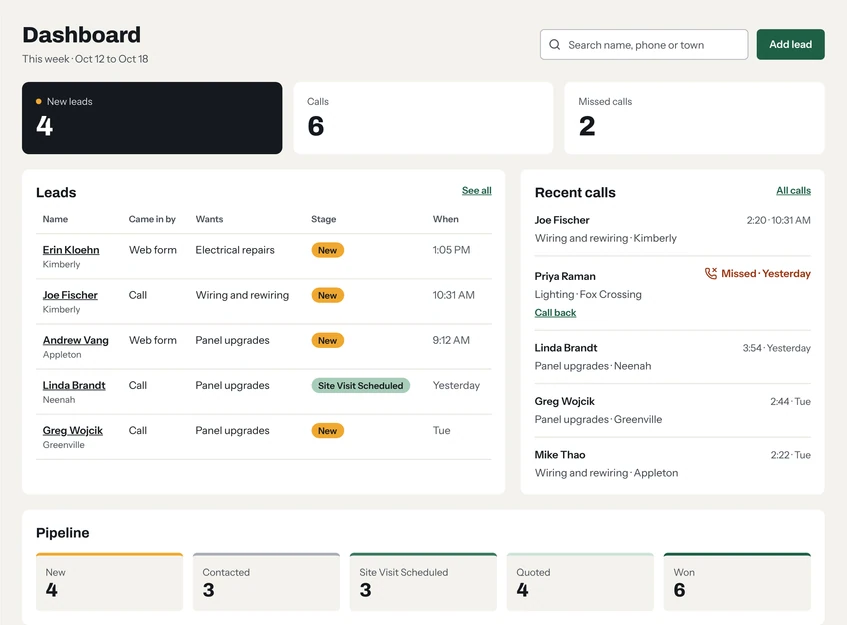
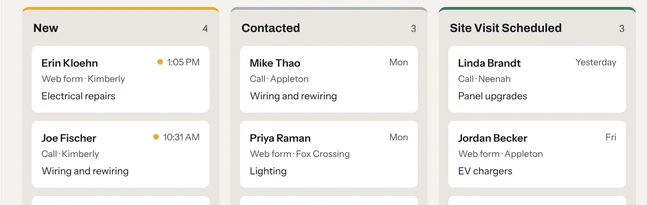
Everything in the plan
- Sign up on your own: a short form, a card on Stripe's checkout, and the account is ready in minutes
- A tracking phone number that rings through to your phone, with the caller's own number showing
- Every call logged; optional call recording with the recorded-call announcement
- A transcript and a plain-language summary of each recorded call, and the job details heard on the call filled in on the lead (you confirm or dismiss each one)
- Missed-call and new-lead alerts by text and email to the people you choose
- Web form leads land in the CRM automatically
- Lead board with stages, notes and the full customer timeline
- Custom job fields and pipeline stages for your company
- Customer list and CSV export (customers and notes)
- Each company's data is private to that company
- Call a lead or customer back from the CRM
- Your website, served by Leadyard: answer a short setup interview and the pages are drafted for you; edit and publish every page with preview and version history; three looks to choose from
- Your website at yourcompany.getleadyard.com from day one
- Monthly subscription with card update, invoices and cancel any time from the Billing page; no contract
- The CRM works on a phone's browser
Straight answers
- Do I need a sales call to get started?
- No. Sign up on your own with a short form and a card on Stripe’s checkout, and your account is ready in minutes. Book a call if you’d rather talk it through first.
- Does the tracking number ring my own phone?
- Yes. The tracking number on your website rings through to the phone you already use, and you see the caller’s own number.
- Are calls recorded?
- Only if you turn it on. When recording is on, callers hear a recorded-call announcement, and each recorded call gets a transcript and a plain-language summary. Every call is logged either way.
- What happens to the details someone gives on a call?
- For a recorded call, the job details heard on the call are filled in on the lead. You confirm or dismiss each one.
- Who gets the missed-call and new-lead alerts?
- Whoever you choose. Alerts go out by text and email to the people you add, so the right person hears about a missed call or a new lead.
- What happens when someone fills out the form on my site?
- The submission lands in your CRM as a lead automatically, and the people you chose get a new-lead alert.
- Can I change the stages or add my own fields?
- Yes. Rename the pipeline stages to match how you work and add the job fields your trade needs.
- Can I call someone back from the CRM?
- Yes. A missed call shows a call-back link, and every lead and customer record has a Call button.
- Where does my website live, and can I change it?
- At yourcompany.getleadyard.com from day one. Your pages are drafted from a short setup interview, you pick one of three looks, and you can edit and publish any page with preview and version history.
- Do I keep my own domain?
- Yes. A domain you register and pay for is yours, and we never hold it. Your Leadyard site lives at yourcompany.getleadyard.com.
- Does it work on my phone?
- Yes. Open the CRM in your phone’s browser.
- Can I get my data out?
- Yes. Your customers and notes can be exported to CSV at any time.
- Who can see my leads?
- Your company, and only your company. Every Leadyard customer works in their own yard, with their own calls, leads and customer list.
- What happens to my number if I cancel?
- Your tracking number can be ported out to you if you cancel.
- Is there a contract or a setup fee?
- No contract and no setup fee. One plan at $130 a month, and you can cancel any time from the Billing page.
Want to see it for your business?
Sign up in minutes, or book a call and we’ll walk through it with you.