
What happens when someone calls your number
How a call moves through Leadyard: the number rings your phone, the call is logged, recorded if you want, transcribed and summarized, and your people alerted.

The calls that matter most tend to come in while both hands are busy. You’re on a ladder, under a sink, or halfway through a conversation with a customer who is standing right there. Here is what Leadyard does with that call, step by step, so you know what’s waiting for you when you climb down.
The number on your site is a tracking number
The phone number on your website belongs to your company and rings through to the phone you already carry. You answer the same way you always have. The difference is on your screen: you see the caller’s own number, not ours, so a missed call looks like any other missed call and you can ring them back from your recent calls list if you’d rather.
That number is yours for as long as you’re with us, and if you ever leave, it can be ported out to you.
Every call is logged, whether or not you pick up
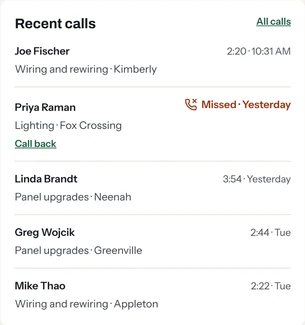
Each call to the number lands in the CRM as it happens: who called, when, and whether anyone answered. A missed call is flagged so it stands out from the ones you took. You don’t write anything down, and you don’t have to remember to.

Turn recording on if you want more than a log
Recording is off until you switch it on. When it’s on, callers hear a recorded-call announcement before they’re connected, and the recording sits on the call in the CRM for you to play back later. Some owners want this for every call and others leave it off; the log is the same either way.
A recorded call comes with a transcript and a summary
This is the part that saves the most time. Each recorded call gets a full transcript and a plain-language summary, so a long conversation about a basement finish reads as a few lines: what they want, where, and when they were hoping to start.
The job details heard on the call are filled in on the lead as well, and each one waits for you to confirm it or dismiss it. Nothing goes onto the lead as fact until you say so.

The people you choose hear about it right away
A missed call or a new lead sends an alert by text and email to whoever you’ve added: you, a partner, the person who runs the office. Suppose you’re on a roof and your spouse handles the phone from home. The alert reaches them, and they can call the customer back before that customer tries the next name on the list.
Calling back takes one tap
A missed call in the CRM shows a call-back link, and the same Call button sits on every lead and customer record. Tap it and your own phone rings first; press 1 and the customer is dialed from your tracking number, so they see the business number they already know rather than your personal cell.
And then it’s a lead
Every call becomes a lead on the board, where it moves from New to Won next to the leads that came in through your website’s form. Notes, the call itself, the transcript if there is one, and every later call with that customer sit on one timeline. When they ring in the spring about the second half of the job, the whole history is already there.
That’s the whole path: ring, log, record if you want, transcribe, alert, call back, work the lead. None of it needs you to stop what you’re doing, which is the point. Pricing and everything else in the plan are on the pricing page.